Select a pilot: Define a clearly defined process with measurable benefits.

SAP Autonomous CX: What it is, how it works, and how companies can get started
Content:
In May 2026, SAP presented Autonomous CX as a vision at Sapphire; the first concrete CX assistants followed in October at SAP Connect in Las Vegas. Since their release in the third quarter, the new features have been available to select customers; general availability is planned for the first quarter of 2027. For companies using SAP Sales Cloud, Service Cloud, or Commerce Cloud, this is an opportune time: data and approval rules can now be prepared before the assistants become widely available.
Starting with a manageable pilot project lays the exact foundation on which other areas can build. But what specific tasks do the AI agents handle, and what does your company need to prepare for this?
What is “SAP Autonomous CX”?
“CX” stands for Customer Experience – that is, everything a company does related to its customers: marketing, sales, e-commerce, and customer service. With SAP Autonomous CX, SAP connects these areas with AI assistants and AI agents that perform tasks largely autonomously – within defined rules and under human supervision. SAP sums up the idea in one sentence: “People set the direction. AI executes.”
Autonomous CX is one of five areas within the SAP Autonomous Suite. The other areas – Finance, Procurement, Supply Chain, and Human Resources – share a common data foundation. Above this lies Joule, SAP’s AI interface; beneath it is the technical platform, the SAP Business AI Platform, which handles data, rules, and control.
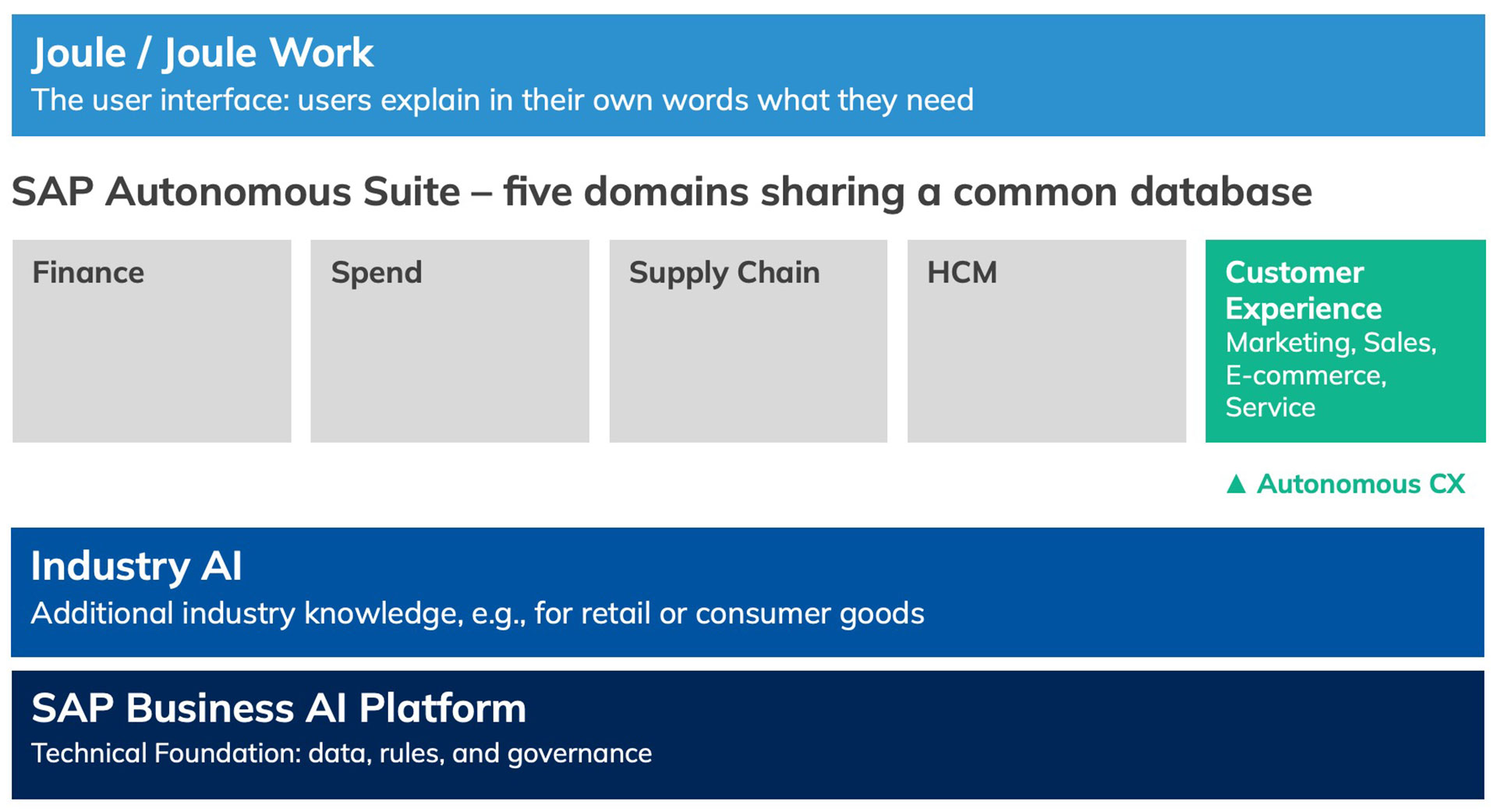
Figure 1: Autonomous CX as a customer-facing component of the SAP Autonomous Suite (simplified illustration; source: SAP Learning)
It’s important to understand that users continue to work in their familiar SAP customer applications, such as SAP Sales Cloud, SAP Service Cloud, SAP Commerce Cloud, or SAP’s marketing solutions. What’s new is that they can initiate tasks via Joule using their own words, and the AI uses the company’s business data – such as customer history, contracts, prices, or inventory – to do so. The company itself determines what the AI is allowed to do on its own and what requires human approval.
Who does what: Joule, assistants, and agents?
The easiest way to understand this interaction is to compare it to a well-organized service team. This comparison is for illustrative purposes; SAP describes the roles themselves as follows in its training materials.
- Human: sets goals and rules, approves key results, and makes decisions in exceptional cases.
- Joule or Joule Work – like the front desk: Here, users describe what they need in their own words. Joule retrieves the relevant data and assigns the appropriate helpers.
- Joule Assistant – like a team leader: knows the tasks associated with a role and assigns the work to the appropriate agents.
- Joule Agent – like a specialist: completes a specific, multi-step task, such as preparing a service case.
The common thread: The AI assists, but makes decisions on its own only where the company explicitly permits it.
What processes does Autonomous CX cover?
SAP organizes the work into three end-to-end processes: from interest to contact (Market to Lead), from contact to delivery (Lead to Fulfillment), and from customer issue to resolution (Issue to Resolution). Each area has its own assistants, such as for campaigns, offers, online orders, or service cases. Some of these are already available, while others are currently available to select customers or have been announced.
For online retail, SAP also provides agents that work directly within the online store: a Shopping Agent advises customers through dialogue; a Digital Service Agent answers service questions based on approved company knowledge and transfers the inquiry to a human agent if necessary; and a Catalog Optimization Agent (currently in beta) improves product descriptions and product features.
What does this look like in practice for customer service?
A customer reports a malfunction with their system via email. The Case Management Assistant creates the case, categorizes it, summarizes it, and forwards it to the appropriate team – along with the customer’s history, warranty information, and product data. The service representative sees relevant knowledge articles, a suggestion for the next step, and a draft response.
They review it, make adjustments, and send it. The resolved case generates a draft for a new knowledge article.
Behind each of these steps is a specialized AI agent – but the final decision is made by a human.
What SAP technologies are behind this?
For this to work, several components build on one another. The order is not arbitrary: without the platform and the authentication service, there is no Joule, and without Joule, there are no agents in the customer application.
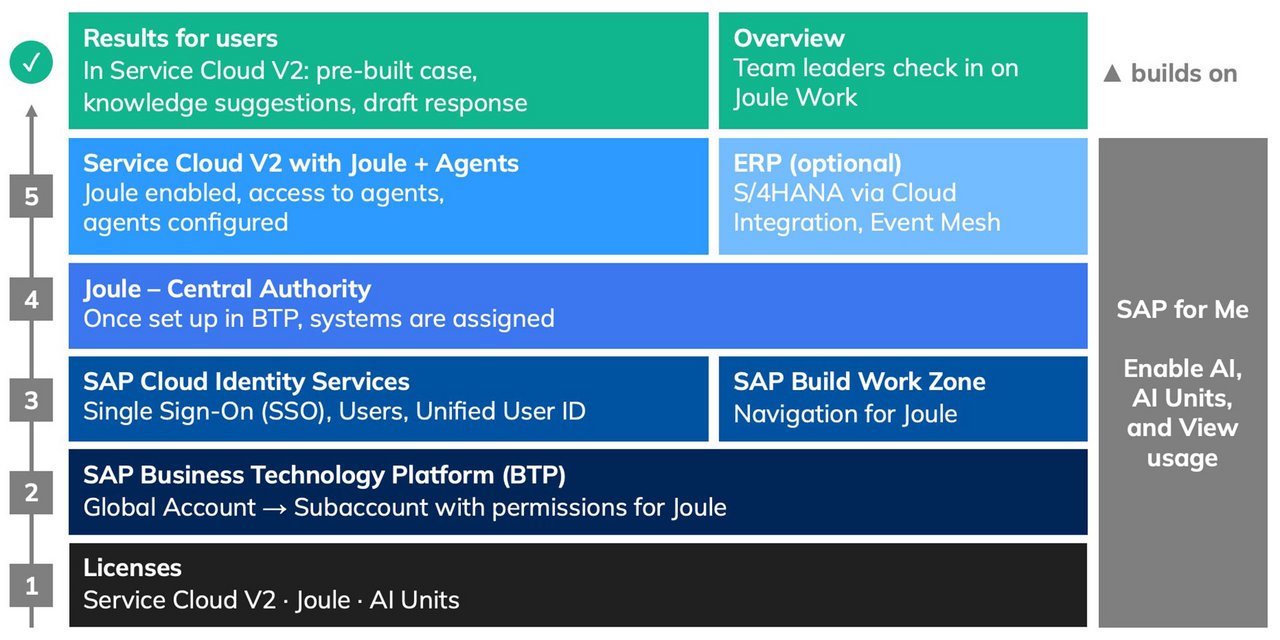
Figure 2: From licenses via SAP BTP and Joule to the result in SAP Service Cloud Version 2 (schematic)
Licenses and AI Units: The foundation
It all starts with the licenses, for example, for SAP Service Cloud Version 2 and Joule. The agents are billed via AI Units, a usage-based unit. The AI functions are activated and monitored in the SAP customer portal SAP for Me.
SAP BTP and Joule: The technical foundation
Joule is set up centrally once on the SAP Business Technology Platform (BTP). The SAP Cloud Identity Services authentication service ensures that users have the same user ID across all systems. Only then are Joule and the agents activated in the respective customer application.
Joule Premium for CX: An additional tool for sales, service, and commerce
With Joule Premium for CX (SAP CX AI Toolkit), SAP offers a browser-based application that answers questions with source citations, analyzes emails, and allows users to create their own agents. According to an SAP Community post, every request there goes through a multi-stage verification process: Only data that the user is authorized to access is used, personal data is anonymized, and the data is not used to train the language models.
Can Autonomous CX be used on its own?
Yes, step by step. According to SAP, Autonomous CX can be implemented “process by process”; it is possible to start with a single customer application.
At the same time, SAP describes Autonomous CX as closely linked to finance and the supply chain: inventory data feeds into decisions in e-commerce, and financial data into quoted prices. In our assessment, the full impact will therefore only be realized once data from the ERP system and these areas is also incorporated.
What does a company need to get started?
The best way to get started is with a small, clearly defined pilot project, for example in customer service. We recommend the following sequence:
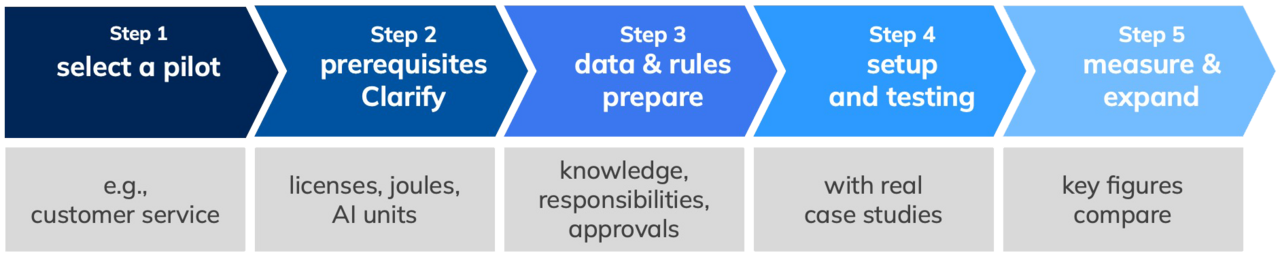
Figure 3: The path to implementation
Clarify prerequisites: Coordinate licenses, Joule, AI Units, and the availability of the desired assistants with SAP.
Prepare data and rules: Update knowledge articles, maintain customer data and responsibilities, and define what the AI is allowed to do without approval.
Set up, test, and train: Activate components, test with real-world examples, and train users – for example, using the resources available on learning.sap.com.
Measure and scale: Collect key metrics before launch, compare them with the results, and only then roll out the solution.
What benefits does Autonomous CX offer?
Less routine work: Agents prepare cases, responses, and offers.
Faster and more consistent responses for customers.
Data works together: Customer and business data are no longer stored in separate systems.
Control remains with humans: Agent actions are traceable and reversible.
A study by BCG cited by SAP cites, among other things, more correctly assigned tickets and more first-contact resolutions for customer service (Figure 4). These figures are manufacturer estimates; we recommend collecting your own baseline data before implementation.
Benefits according to a study by BCG and SAP (2026, manufacturer's data)
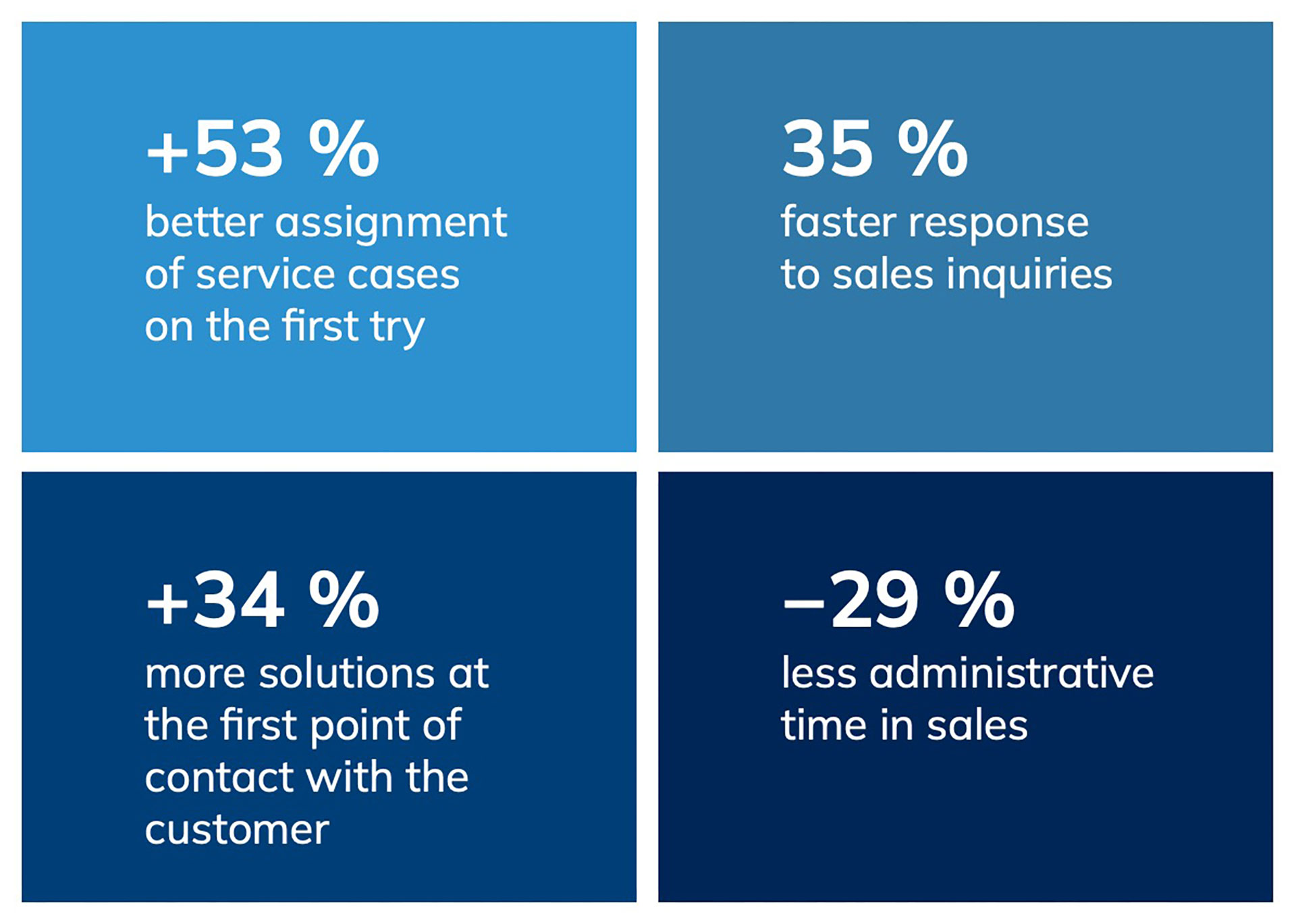
Figure 4: The benefits according to the 2026 BCG/SAP study (manufacturer’s specifications)
Conclusion
SAP Autonomous CX introduces AI assistants and AI agents to marketing, sales, e-commerce, and customer service. The AI handles routine tasks and prepares decisions; humans set the direction and retain control. Technically, this requires a solid foundation consisting of contracts, SAP BTP, an authentication service, and Joule – while from a business perspective, it primarily requires well-maintained data and clear rules.
Many assistants are currently being rolled out in phases. Those who start now with a manageable pilot project will gain early experience and build the data foundation on which other areas can be developed.
Would you like to know how SAP Autonomous CX can be used in your customer service operations?
We’ll support you from the initial assessment through the selection of a suitable pilot project to setup and training.

FAQs:
1. What is the difference between Joule and an AI agent?
Joule is the interface through which users initiate tasks in their own words. A Joule agent performs a specific, multi-step task in the background. Joule Assistants coordinate multiple agents for a given role.
2. Do users have to learn a new interface?
3. Which areas benefit the most?
4. Can Autonomous CX be used without the other SAP Autonomous areas?
5. What are the technical requirements?
6. How is billing handled?
7. How secure is the implementation?
8. Is everything available yet?
Contact our expert
